
Updated 26 th August 2026
MetaMask can give you direct control over cryptocurrencies, stablecoins and compatible tokenized assets.
However, that control comes with a serious responsibility.
A bank may help when someone steals your password. MetaMask cannot simply reverse a blockchain transaction or restore a wallet if you lose its recovery method.
Therefore, setting up MetaMask safely matters more than completing the process quickly.
This guide explains how to install MetaMask, create a wallet, secure it and receive your first tokens. It also covers networks, transaction fees, hardware wallets and the scams beginners frequently encounter.
TL;DR
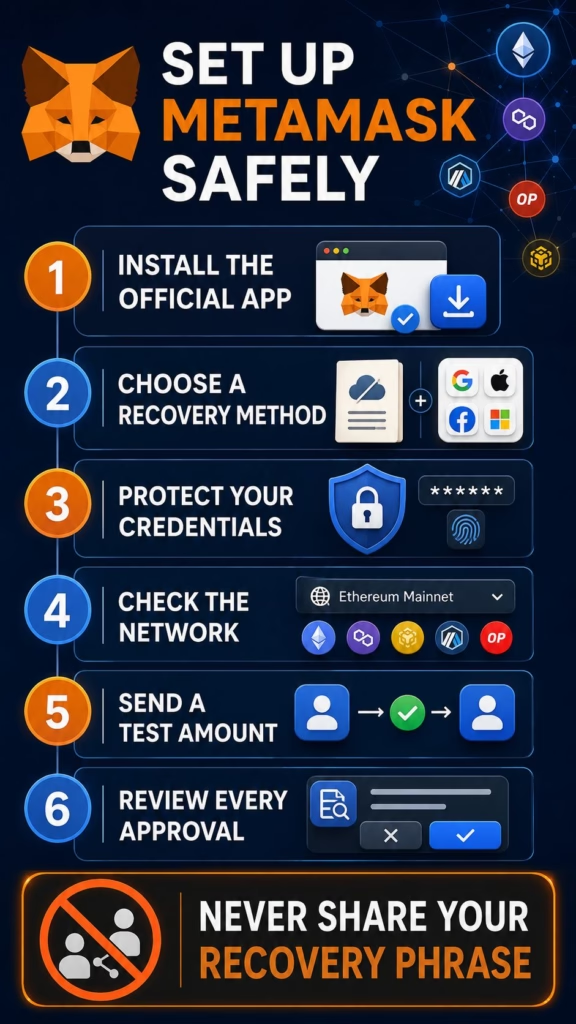
- Download MetaMask only through MetaMask.io or a verified official app store.
- MetaMask now supports Ethereum, other EVM networks, Solana and Bitcoin.
- MetaMask is the wallet. It can contain several accounts, addresses and networks.
- New Extension users can choose a Secret Recovery Phrase or supported social login.
- Never share a recovery phrase, private key, social-login password or verification code.
- Send a small test transaction before transferring a significant amount.
- Confirm the receiving address, blockchain network and token contract.
- Connecting to a dApp is different from granting it permission to spend tokens.
- Blockchain transactions are usually irreversible after confirmation.
- Consider a hardware wallet for valuable or long-term holdings.
What Is MetaMask?
MetaMask is a self-custodial cryptocurrency wallet.
A self-custodial wallet allows the user to control the keys needed to authorize blockchain transactions. MetaMask provides the interface, but it does not hold assets inside a conventional company account.
The assets remain recorded on their respective blockchain networks.
MetaMask began as an Ethereum wallet. Since then, it has expanded into a multichain application.
Its current architecture supports:
- Ethereum
- Ethereum layer-two networks
- EVM-compatible blockchains
- Solana
- Bitcoin
- additional networks through MetaMask Snaps
MetaMask’s multichain account documentation explains how one wallet can contain addresses for several blockchain ecosystems.
Support does not mean that every token works on every network.
A token on Ethereum is different from a similarly named asset on Solana, Polygon or BNB Chain. Therefore, users must verify the network before receiving or sending anything.
Wallet, Account and Address: What Is the Difference?
These terms often get mixed together.
Wallet
A wallet is the wider collection of accounts controlled through a recovery method.
That recovery method might be a Secret Recovery Phrase, an imported private key, a hardware wallet or MetaMask’s social-login system.
Account
An account organizes one or more blockchain addresses inside the wallet.
MetaMask’s newer multichain structure can associate Ethereum, Solana and Bitcoin addresses with the same account view.
Address
An address is the public destination used to receive assets on a specific network.
Ethereum and other EVM addresses normally begin with 0x. Bitcoin and Solana use different address formats.
You may share a public address when receiving tokens.
However, you must never share the private key, Secret Recovery Phrase or credentials that control it.
What You Need Before Starting
Prepare the following before installing MetaMask:
- an updated computer or smartphone
- a trusted internet connection
- access to the official MetaMask website
- time to complete the setup without interruption
- a secure offline place for recovery information
- an understanding that transactions may be irreversible
Avoid creating a wallet on a shared computer, public workstation or device that you do not control.
You should also update the operating system and browser. An old browser extension or infected device can undermine the wallet’s security.
Step 1: Download MetaMask from the Official Source
Fake MetaMask extensions and cloned mobile applications exist.
Some copies imitate the real wallet while secretly recording recovery information. Therefore, never install MetaMask through a social-media link, direct message, email attachment or random download website.
The safest starting point is:
Select Get MetaMask and follow the official link for your browser or mobile device.
MetaMask supports major browsers and provides applications through the Apple App Store and Google Play Store.
Before installing:
- Confirm that the address bar shows
metamask.io. - Check that the connection uses HTTPS.
- Follow the official link to the extension or application store.
- Examine the publisher and download history.
- Avoid sponsored search advertisements that imitate the official result.
MetaMask warns users to install only through its website or the appropriate official app store because fraudulent copies can steal recovery phrases. Its official installation guide provides current browser and mobile instructions.
Step 2: Choose “Create a New Wallet”
After installation, MetaMask asks whether you want to create a wallet or access an existing one.
Choose Create a new wallet if you are starting from scratch.
Do not select the import option unless you already control a legitimate recovery phrase or private key.
Importing a wallet does not move assets between blockchains. Instead, it allows another application to control the same existing addresses.
Anyone who asks you to import a recovery phrase they supplied is probably trying to scam you.
Step 3: Choose Your Recovery Method
MetaMask Extension currently offers two main setup routes:
- Secret Recovery Phrase
- Google, Apple or Telegram login
The choice affects how you recover the wallet.
Option 1: Secret Recovery Phrase
The traditional method creates a 12-word Secret Recovery Phrase, often called an SRP or seed phrase.
These words act as the master key to the wallet.
Anyone who obtains them can restore the wallet elsewhere and move its assets. They do not need your MetaMask password, device or permission.
When MetaMask displays the phrase:
- Write every word in the correct order.
- Keep the words in English.
- Check the spelling carefully.
- Store the record offline.
- Create a second secure physical backup if appropriate.
- Complete MetaMask’s confirmation process.
Do not:
- take a screenshot
- photograph the phrase
- email it to yourself
- save it in cloud storage
- place it inside an ordinary online document
- send it through a messaging service
- give it to MetaMask Support
- type it into a website or dApp
- change the word order
MetaMask’s recovery phrase and private-key guide explains that the company cannot restore a lost phrase.
You should only enter the phrase when you deliberately restore or import the wallet through a verified MetaMask installation.
A website asking for it to “validate,” “synchronize” or “upgrade” your wallet is attempting to steal it.
Option 2: Google, Apple or Telegram Login
MetaMask Extension also allows new users to link a supported Google, Apple or Telegram account.
With this option, MetaMask backs up the wallet’s recovery information online. Access requires both the linked social account and a separate MetaMask password.
The user does not manually store a Secret Recovery Phrase during setup.
This option may feel easier. However, it creates a different dependency.
You must protect:
- the linked social account
- its recovery options
- the MetaMask password
- associated email and device security
Use a unique password and enable the strongest authentication offered by the social provider.
Social login does not turn MetaMask into a conventional custodial exchange account. It uses a different recovery structure for the wallet.
MetaMask’s social-login explanation describes how the online backup and account credentials work.
Which Recovery Method Is Better?
Neither method removes responsibility.
A Secret Recovery Phrase provides independence from a social account. However, losing or exposing the phrase can permanently compromise the wallet.
Social login removes the need to protect a visible list of words. Nevertheless, it increases your reliance on the linked account and password.
Choose the method you genuinely understand and can secure.
Do not choose an SRP because it sounds more “decentralized” if you are likely to photograph it and leave it in cloud storage.
Likewise, do not choose social login while using a weak or reused password.
Step 4: Create a Strong MetaMask Password
The MetaMask password locks the installed application on that device.
It does not replace a Secret Recovery Phrase.
If someone obtains your SRP, changing the MetaMask password will not protect the wallet. They can restore it on another device.
Use a password that is:
- unique to MetaMask
- long
- difficult to guess
- unrelated to personal information
- not reused on another website
If you selected social login, the MetaMask password also forms part of the recovery process. Losing both required elements could prevent access.
Step 5: Finish Setup and Check the Wallet
After confirming the recovery method, MetaMask opens the main wallet interface.
Before adding funds, locate:
- the account name
- the public receiving address
- the enabled networks
- the asset list
- the activity or transaction history
- the network-fee information
- the settings and security controls
MetaMask now displays assets across several enabled networks. You can filter the view when you want to examine one blockchain.
Take time to understand the interface before moving money.
A wallet that has been created successfully does not need immediate funding.
Step 6: Understand Networks Before Receiving Tokens
This is where beginners make expensive mistakes.
A wallet address alone does not tell you which network the sender intends to use.
For example, USDC can exist on Ethereum, Polygon, Base, Solana and several other networks. Those versions are not automatically interchangeable.
Before withdrawing from an exchange or tokenized investment platform, confirm:
- The exact asset.
- The blockchain network.
- The receiving address format.
- Whether MetaMask supports that network.
- Whether the sending platform supports the same network.
- Which asset pays the transaction fee.
- Whether the receiving address requires whitelisting.
MetaMask includes many common networks. Its current network guide lists supported and additional options.
Avoid adding an unknown network from instructions sent through a private message.
If manual setup is necessary, obtain the RPC details and chain ID from the blockchain project’s official documentation.
Step 7: Receive a Small Test Transaction
Never make a large first transfer simply because you copied the address carefully.
Send a small test amount first.
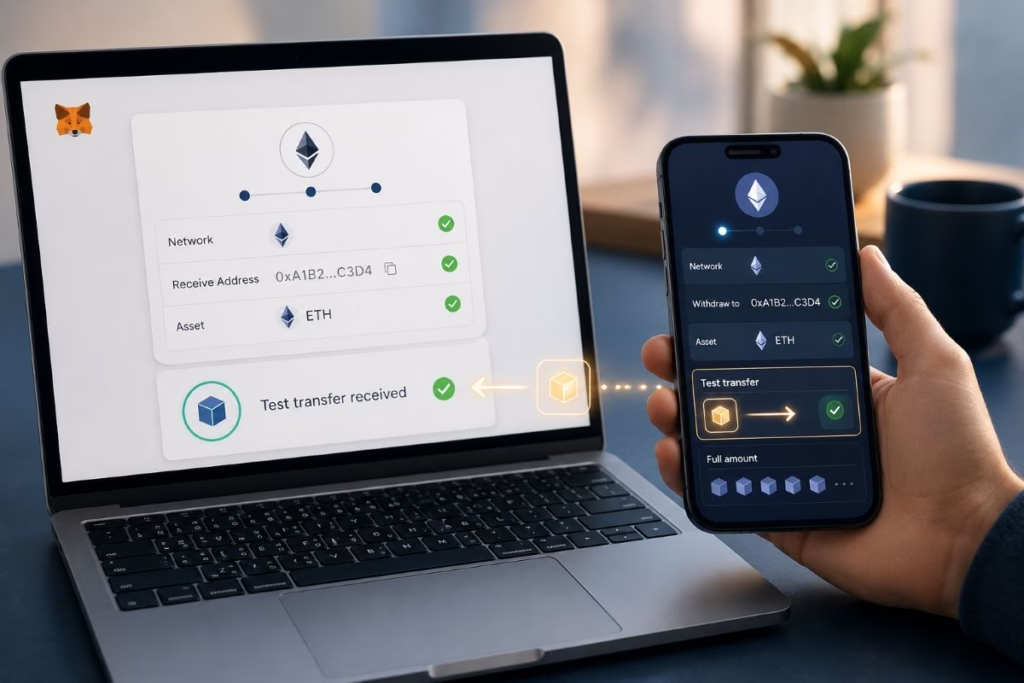
Use this process:
- Open the correct account and network.
- Select the receiving option.
- Copy the public address.
- Paste it into the sending platform.
- Compare the beginning and end of the pasted address.
- Confirm the network on both sides.
- Send a small amount.
- Wait for blockchain confirmation.
- Check the transaction through a trusted block explorer.
- Send the remaining amount only after the test arrives correctly.
Clipboard malware can replace an address after you copy it. Therefore, checking the first and final characters matters.
A test transaction may cost an additional network fee. That small cost is preferable to losing a larger transfer.
Step 8: Keep Enough for Network Fees
Blockchain transactions normally require a network fee, often called gas.
The required asset depends on the network.
Examples include:
| Network | Common fee asset |
|---|---|
| Ethereum | ETH |
| Base | ETH |
| Arbitrum | ETH |
| Polygon | POL |
| BNB Chain | BNB |
| Solana | SOL |
| Bitcoin | BTC |
MetaMask labels the cost as the network fee on transaction confirmation screens.
Some supported networks and transaction types allow fees to be paid with alternative tokens. However, beginners should not assume that feature will always be available.
Before moving a token, check that the wallet can cover the required fee.
MetaMask normally calculates the gas settings automatically. Beginners rarely need to change the gas limit manually.
Reducing it without understanding the transaction can cause delays or failures. Even failed transactions may consume fees because the network still processed the attempt.
MetaMask’s gas and network-fee guide explains how these charges work.
Step 9: Add a Token If It Does Not Appear
A confirmed token can exist at your address without appearing automatically in MetaMask.
First, verify the transaction through the appropriate blockchain explorer.
Next, check that you are viewing the correct network.
MetaMask automatically displays many popular ERC-20 and Solana SPL tokens. However, it does not maintain a perfect list of every asset.
If the token remains missing, obtain its contract address from:
- the issuer’s official website
- official project documentation
- a reputable block explorer
- the regulated platform that issued the asset
Do not trust a contract address posted in a random comment or direct message.
A fake token can use the same name and symbol as a legitimate asset.
MetaMask’s token-display guide explains how to add a verified custom token.
Step 10: Connect MetaMask to a Tokenized-Asset Platform
Some tokenized investment platforms allow users to connect MetaMask.
Usually, the website presents a Connect wallet option. MetaMask then asks which account you want to share with the platform.
Connecting normally reveals the selected public address. It does not automatically give the platform control over every token.
However, a later request may ask you to:
- sign a message
- approve a token allowance
- authorize a purchase
- submit a blockchain transaction
- change networks
Read each request before approving it.
Never assume that a transaction is safe because MetaMask displayed the confirmation window. The wallet shows what a website asked it to sign; it does not guarantee that the website is honest.
Our guide on how to buy tokenized assets explains the wider process of choosing a platform, completing identity checks and funding a purchase.
Not Every Tokenized Asset Works with MetaMask
The word “tokenized” does not guarantee that an asset can move into a personal wallet.
Some products use public blockchains and support self-custody. Others operate inside closed platforms, regulated custody systems or private ledgers.
For example, investors cannot withdraw HSBC Gold Token to MetaMask. HSBC maintains XGT within its controlled banking infrastructure.
Other issuers may permit external wallets only after approving the investor’s address.
Therefore, check:
- whether withdrawals are permitted
- which blockchain hosts the token
- whether the token contract restricts transfers
- which wallet types the platform supports
- whether the address must pass compliance screening
- whether a secondary market exists
A compatible wallet cannot remove legal, liquidity or issuer restrictions.
If you are new to these structures, our beginner’s guide to RWA tokenization explains what token holders may actually own.
Connecting a Wallet Is Not the Same as Approving Token Spending
This distinction deserves attention.
Connecting MetaMask allows a dApp to view selected public account information.
A token approval can give a smart contract permission to spend a specified amount of a token.
Some applications request unlimited allowances. That may reduce the number of future approval transactions, but it also increases the damage if the contract becomes malicious or compromised.
Where possible:
- approve only the amount required
- verify the contract
- avoid unknown dApps
- review existing allowances
- revoke permissions you no longer need
Disconnecting a website from MetaMask does not necessarily cancel its token allowances.
MetaMask provides separate guidance on revoking smart-contract allowances.
Common MetaMask Scams
Fake Support Representatives
MetaMask Support will not contact you first through direct messages or telephone calls.
Anyone asking for your SRP or private key is attempting to steal the wallet.
Wallet-Verification Requests
There is no legitimate website that needs your recovery phrase to validate or synchronize MetaMask.
Fake Browser Extensions
Cloned extensions may copy the MetaMask name, branding and interface.
Always install through MetaMask.io.
Malicious Token Approvals
A fraudulent dApp may ask for permission to spend your tokens.
Read the requested allowance before confirming.
Address-Poisoning Transactions
Scammers can send tiny transactions from addresses that resemble ones you previously used.
Do not copy a destination from transaction history without checking the entire address.
Fake Tokens and Airdrops
An unexpected token may contain a name or website designed to lure you into a malicious dApp.
Do not interact with unknown tokens simply because they appear in the wallet.
Recovery-Phrase Storage Scams
No cloud backup service, support agent or “security upgrade” needs your phrase.
MetaMask states clearly that its team will never request it. Its security guidance covers common threats.
When Should You Use a Hardware Wallet?
A browser or mobile wallet is convenient for learning and smaller transactions.
However, valuable or long-term holdings deserve stronger protection.
A hardware wallet stores and uses its keys through a separate physical device. Transactions require confirmation on that device.
MetaMask can connect to supported hardware wallets while acting as the user interface.
For the strongest separation, create a new recovery phrase directly on the hardware wallet. Do not import a MetaMask phrase that has already existed on an internet-connected computer.
Importing the old phrase may make the hardware device easier to use, but it does not erase the phrase’s previous exposure.
MetaMask recommends hardware wallets for long-term storage.
What Happens If You Lose Access?
The outcome depends on the setup method.
You Forgot the MetaMask Password
With an SRP-based wallet, you can normally restore access using the Secret Recovery Phrase.
The password alone does not restore the wallet on another device.
You Lost the Device
Install MetaMask on a trusted replacement device and use the legitimate recovery method.
Never type the credentials into a website offering a “remote recovery” service.
You Lost the Secret Recovery Phrase
If the wallet remains unlocked on one device, follow MetaMask’s official instructions to reveal and secure the phrase.
If you lose both the phrase and all wallet access, MetaMask cannot recreate it.
Someone Obtained the Recovery Phrase or Private Key
Treat the wallet as permanently compromised.
Create a fresh wallet with a new recovery method on a clean device. Then transfer remaining assets if it is safe to do so.
Changing the password is not enough.
You Used Social Login
Recovery requires the linked Google, Apple or Telegram account and the MetaMask password.
Protect the social account’s recovery settings and authentication methods before problems occur.
MetaMask Security Checklist
Before holding a meaningful balance, confirm that:
- you installed MetaMask through its official website
- your device and browser are updated
- you understand the selected recovery method
- recovery information is stored safely
- no one else has seen your SRP or private keys
- your password is unique
- you know which network the asset uses
- you have verified the receiving address
- you completed a small test transfer
- you have enough to cover network fees
- you check every signature and approval
- you know how to revoke unused allowances
- valuable holdings use appropriate additional protection
If any item remains unclear, stop before adding more funds.
Final Verdict
Setting up MetaMask takes only a few minutes.
Setting it up safely requires more thought.
The most important choices involve the recovery method, network and way you interact with external platforms.
A strong password cannot rescue an exposed Secret Recovery Phrase. Similarly, the correct wallet address cannot prevent problems if you select an incompatible network.
Start with a small amount. Verify every destination. Read each transaction request.
Most importantly, never let urgency override caution.
Blockchain transactions move quickly, but recovery from a mistake may be impossible.
Frequently Asked Questions
Is MetaMask free?
MetaMask is free to install. However, blockchain transactions can require network fees. Buying, swapping, bridging or using third-party services may involve additional charges.
Is MetaMask only for Ethereum?
No. MetaMask now supports Ethereum, several EVM networks, Solana and Bitcoin. Additional networks may work through MetaMask Snaps.
Is MetaMask a wallet or an account?
MetaMask is a wallet application. It can contain multiple wallets, accounts and network-specific addresses.
Can MetaMask recover my Secret Recovery Phrase?
No. MetaMask cannot recreate a lost SRP. If the wallet still opens on a device, you may be able to reveal the phrase using the official application and password.
Should I store my recovery phrase on my phone?
No. Avoid screenshots, photographs, cloud notes and online documents. Store an SRP securely offline.
Can MetaMask Support ask for my recovery phrase?
No. MetaMask Support will never ask for your SRP or private key.
Is social login safer than a Secret Recovery Phrase?
It creates a different security model rather than a universally safer one. Social login depends on the linked account and MetaMask password. An SRP depends on protecting the phrase yourself.
What happens if I use the wrong network?
The tokens may not appear where expected and can become difficult or impossible to recover. Always confirm that the sender and recipient support the same blockchain network.
Why is my token missing?
First, confirm the transaction on a blockchain explorer. Then check the network and token contract. You may need to add the verified token manually.
Do I need ETH to use MetaMask?
You need the appropriate fee asset for the network and transaction. Ethereum normally uses ETH, but other networks use different assets. Some supported transactions allow alternative fee payments.
Can I store tokenized real estate in MetaMask?
Some platforms issue compatible tokens that can move to approved MetaMask addresses. Others keep investments within controlled accounts or private systems. Check the platform’s withdrawal, network and compliance rules.
Should I keep all my assets in one MetaMask wallet?
Holding everything in one software wallet creates a single point of failure. Separate wallets or a hardware wallet may provide better risk control for valuable holdings.